Resign a member
Last updated 5 June 2026
Resigning a member ends their club membership — and optionally their Gliding New Zealand membership — while keeping their record and history. Use this when someone leaves the club. Don't delete the record: that would lose their ratings, history, and details.
Before you start
- You need to be a club administrator. You can resign a member from any club you administer.
- Resigning them from Gliding New Zealand as well is only available to the administrator of their primary club.
Step 1 — Open the member's edit form
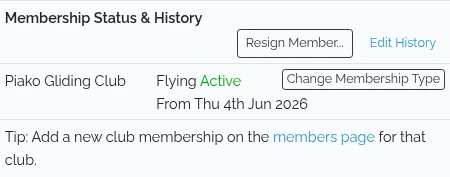
Go to Members, open the member, and click Edit Member. Scroll down to the Membership Status & History card.
Step 2 — Open the resign panel
Click Resign Member…. A panel opens listing the clubs the member belongs to.
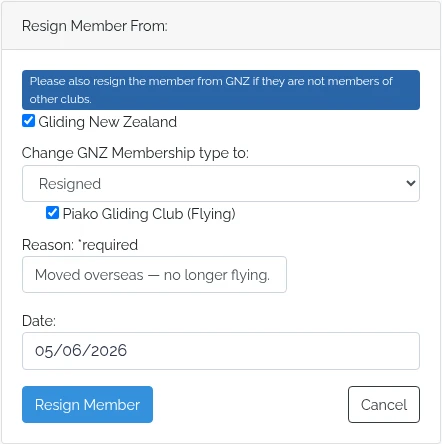
Step 3 — Choose what to resign
- Tick each club to resign the member from. You can only tick clubs you administer.
- Tick Gliding New Zealand to resign them nationally as well — this is only available to the primary club's administrator. When you do, choose the GNZ membership type to move them to (for example, Resigned).
- Ticking every club selects Gliding New Zealand for you automatically.
Step 4 — Add a reason and date
- Enter a Reason — this is required and is saved against the record.
- Set the Date — it defaults to today, so change it if the member left earlier.
Step 5 — Confirm
Click Resign Member. The membership now shows as Ended/Resigned in the history, with the dates and reason recorded. If you also resigned them from GNZ, head office is notified by email.
What happens next
The record isn't deleted — the member's ratings, contact details, and history are all kept. If they rejoin later, add them back from the members page.